HVAC Estimating & Invoicing Software for HVAC Contractors
An HVAC bid has equipment, a long list of install materials, labor and permits, and each one needs its own markup. Trades HQ keeps it all on one estimate and shows your real profit when the job is done.
Equipment is a big share of the price. A small mistake in equipment markup changes the whole job.
Install materials add up. Line set, pad, disconnect, whip, drain line, thermostat and fittings are easy to leave off.
Sizing comes first. Equipment should be sized from a load calculation (such as ACCA Manual J), not just matched to the old unit.
Permits and extras. Permits, inspections, haul-away of the old unit and electrical work all belong on the bid.
How Trades HQ helps HVAC contractors
Price book with HVAC items. Keep your equipment and material prices in one place and reuse them on every bid.
Labor-rate guidance by state. See typical HVAC mechanic wages in your state, then set your own rate.
Material price requests. Send one price request to all your suppliers, pick the best quote, and turn it into a purchase order.
Bid work out to other subs, for example an electrician for the disconnect.
Professional proposals customers approve online, then one click to invoice.
Live job profit as equipment, labor and materials come in.
An HVAC change-out estimate, step by step
Confirm the right equipment size from a load calculation.
Add the equipment from your supplier quote.
Add every install material as its own line.
Estimate labor hours for removal, install and startup.
Add permit, inspection and haul-away.
Apply your markup and overhead.
Example checklist for a split-system change-out (no prices; use your own):
Line
Notes
Condenser and air handler or coil
From supplier quote
Line set, fittings, refrigerant
As needed
Pad, disconnect, whip
Electrical tie-in may need a licensed electrician
Drain line, float switch
Thermostat
Labor: removal, install, startup
Your hours × your rate
Permit and inspection
Check your local jurisdiction
Haul-away of old equipment
Pricing tip: Decide your markup on equipment, materials and labor on purpose, not out of habit. And remember that markup and margin aren't the same number: a 20% margin needs a 25% markup. The Estimating Basics guide walks through the math, and the free markup and margin calculator does it for you.
See it in Trades HQ
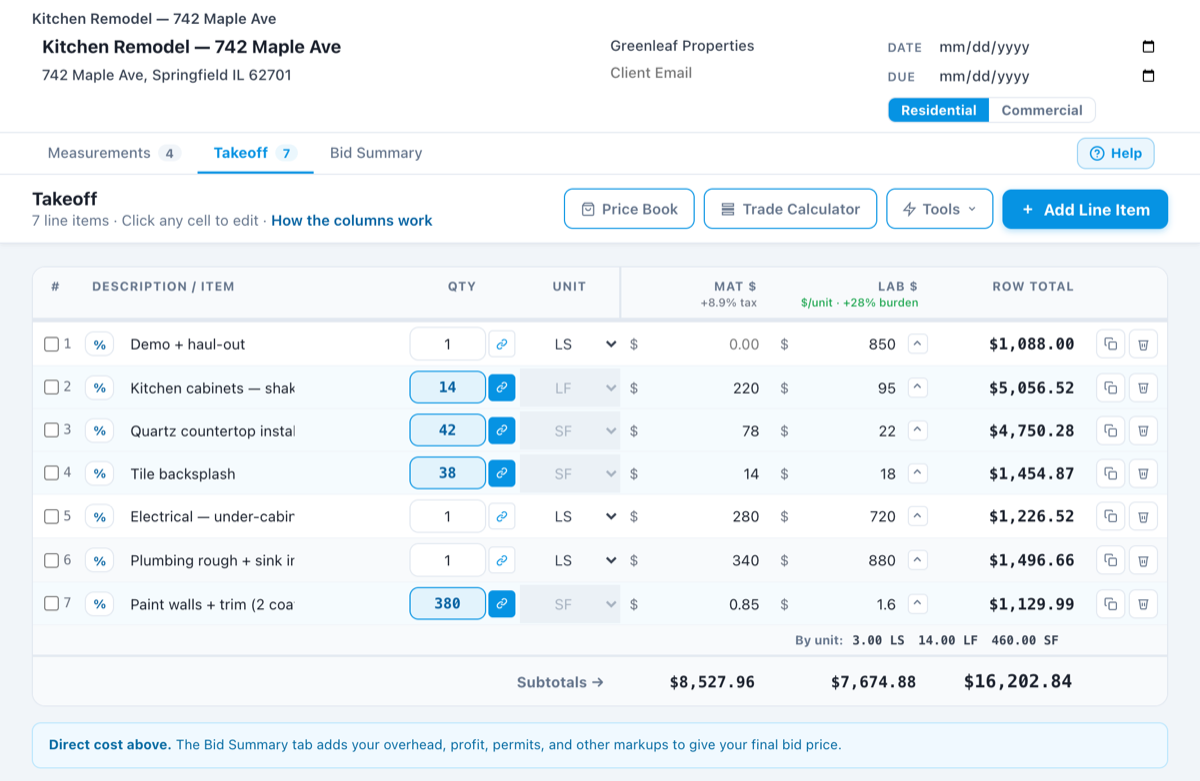
A sample estimate in Trades HQ. Each line has its own material and labor cost, and the Bid Summary adds your overhead and profit. Sample numbers.
Questions HVAC contractors ask
How should I mark up HVAC equipment?
Many HVAC contractors mark up equipment, materials and labor differently. Whatever you choose, set your overhead and profit so the final price covers all your costs. Trades HQ applies your overhead and profit to every estimate the same way.
Can I get prices from several suppliers at once?
Yes. Send one price request to all your suppliers. When their quotes come back, pick the best one and turn it into a purchase order, and the paid bill lands in the job’s costs.
Does it work with QuickBooks?
Trades HQ exports your invoices in a format ready to import into QuickBooks, so your bookkeeper doesn’t have to retype them.
Is there a free trial?
Yes. Every plan starts with a 14-day free trial, and you don’t need a credit card to start. Plans start at $75 a month, and you can cancel anytime.
Examples on this page use illustrative numbers only. Use your own costs, rates and local requirements. This page is general information, not legal, tax, or financial advice.