Estimating & Invoicing Software for Drop Ceiling Installers
A drop ceiling bid is tiles, grid, wire and the fixtures that sit in it. Trades HQ helps you count it, price it with your own rates, and see what each job really made.
Grid pieces add up. Main tees, cross tees, wall angle and hanger wire each have their own count.
Tile choices. Standard, moisture-resistant and specialty tiles cost very different amounts.
Fixtures in the grid. Lights and registers change the layout and the labor.
Commercial schedules. Many jobs follow a GC's schedule and progress billing.
How Trades HQ helps drop ceiling installers
Ready-made ceiling items in your Price Book, like 2 × 2 and 2 × 4 tiles, main tees, cross tees, wall angle, hanger wire, LED troffers and lay-in registers. Add your prices once and reuse them.
Measure from blueprints. Measure ceiling areas right off a reflected ceiling plan PDF.
Bid work out to other subs, for example an electrician for the light fixtures.
Progress billing for commercial jobs.
Proposals customers approve online, then one click to invoice.
Live job profit as labor and materials come in.
A drop ceiling estimate, step by step
Measure the room area and the perimeter.
Count tiles from the area and the tile size.
Add wall angle for the perimeter.
Count main tees, cross tees and hanger wire from your grid layout.
Add lights and registers, and labor for the grid and the tiles.
Apply your overhead and profit.
Example (illustrative): a 12 × 20 ft room with 2 × 4 tiles.
Step
Math
Result
Ceiling area
12 × 20
240 sq ft
2 × 4 tiles (8 sq ft each)
240 ÷ 8
30 tiles
Plus about 10% for cuts
30 × 1.10
33 tiles
Perimeter
2 × (12 + 20)
64 ft
Wall angle in 12 ft pieces
64 ÷ 12 = 5.3, round up
6 pieces
Pricing tip: Price the grid and the tiles as separate labor lines, since a cut-up room slows the tile work more than the grid. And remember that markup and margin aren't the same number: a 20% margin needs a 25% markup. The Estimating Basics guide walks through the math, and the free markup and margin calculator does it for you.
See it in Trades HQ
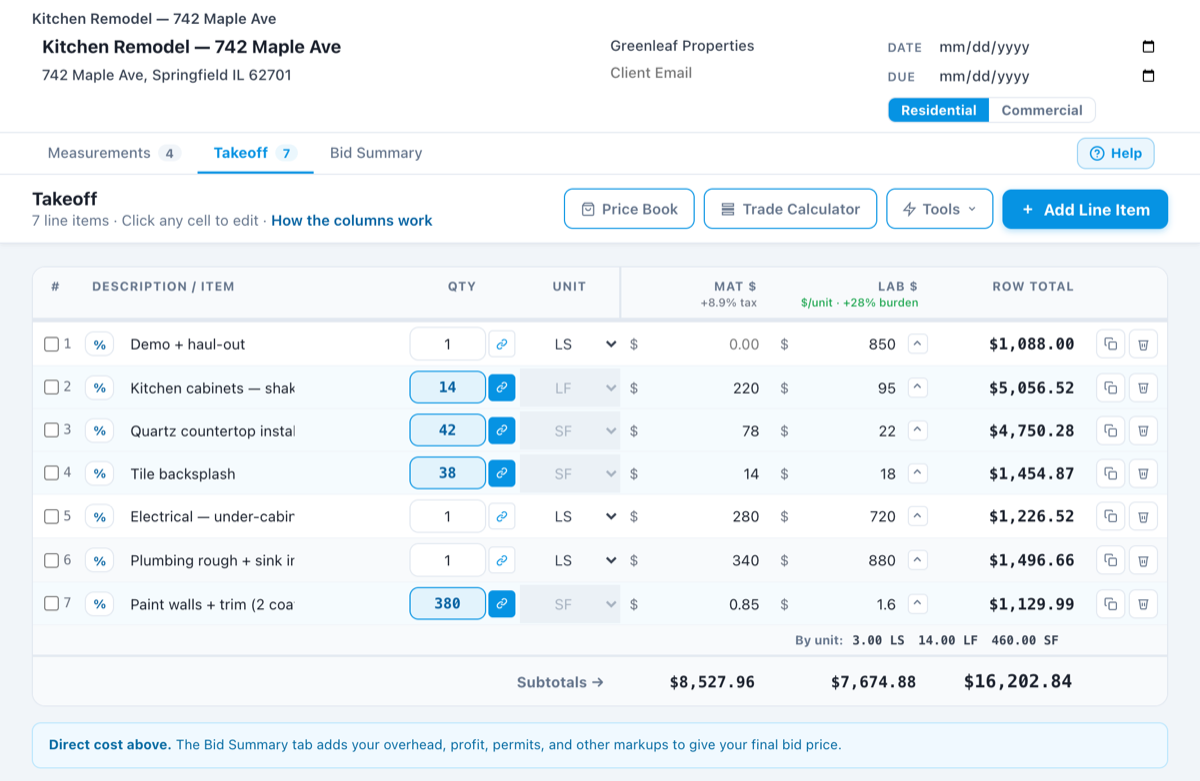
A sample estimate in Trades HQ. Each line has its own material and labor cost, and the Bid Summary adds your overhead and profit. Sample numbers.
Questions drop ceiling installers ask
How many ceiling tiles do I need?
Divide the ceiling area by the area of one tile (4 square feet for 2 × 2, 8 for 2 × 4), then add extra for cut tiles at the edges. Many installers add about 10%.
Can I bill a commercial job in stages?
Yes. Trades HQ supports deposits and progress billing on the same job.
Does it work with QuickBooks?
Trades HQ exports your invoices in a format ready to import into QuickBooks, so your bookkeeper doesn’t have to retype them.
Is there a free trial?
Yes. Every plan starts with a 14-day free trial, and you don’t need a credit card to start. Plans start at $75 a month, and you can cancel anytime.
Examples on this page use illustrative numbers only. Use your own costs, rates and local requirements. This page is general information, not legal, tax, or financial advice.