Handyman work is a lot of small jobs, and small jobs are where pricing mistakes add up. Trades HQ helps you price each one quickly, get it approved, and get paid without the paperwork.
Lots of small tasks. A punch list might have ten items, each needing its own time and materials.
Drive time and trips. A 30-minute fix can cost you two hours once you count the drive and a run to the store.
Hourly vs. flat rate. Customers want a clear price, but you don't want to lose money when a "quick fix" isn't quick.
Scope creep. "While you're here, can you also…" adds up fast if it never makes it onto the estimate.
How Trades HQ helps handymen
Price book for repair work. Start with handyman and repair items, add your own prices, and reuse them on every estimate.
Labor-rate guidance by state. See typical wages for general labor and carpentry in your state, then set your own rate.
Estimates customers approve online. Send a professional estimate by email or link. The customer approves it, and you see it right away.
One click to invoice. An approved estimate becomes an invoice. No retyping line items or totals.
Change orders. When the customer adds work, add a change order so it gets billed.
Live job profit. See what each job actually cost you as labor, materials and mileage come in.
A handyman estimate, step by step
List every task on the punch list as its own line.
Estimate your hours for each task, plus materials.
Add a trip charge or a minimum charge so short visits still pay.
Apply your overhead and profit.
Send it, get approval, and invoice when the work is done.
Example punch list (hours are illustrative; use your own):
Task
Your hours
Materials
Replace bathroom exhaust fan
1.5
Fan, duct tape, wire nuts
Patch two drywall holes
1.0
Patch kit, compound, paint
Rehang sticking door
0.75
Shims, screws
Replace three outlets
0.75
Outlets, cover plates
Caulk tub surround
0.5
Caulk
Total
4.5 hrs
Add a trip charge, multiply your hours by your rate, add materials, then apply overhead and profit.
Pricing tip: Set a minimum charge so a 20-minute fix still covers your drive. And remember that markup and margin aren't the same number: a 20% margin needs a 25% markup. The Estimating Basics guide walks through the math, and the free markup and margin calculator does it for you.
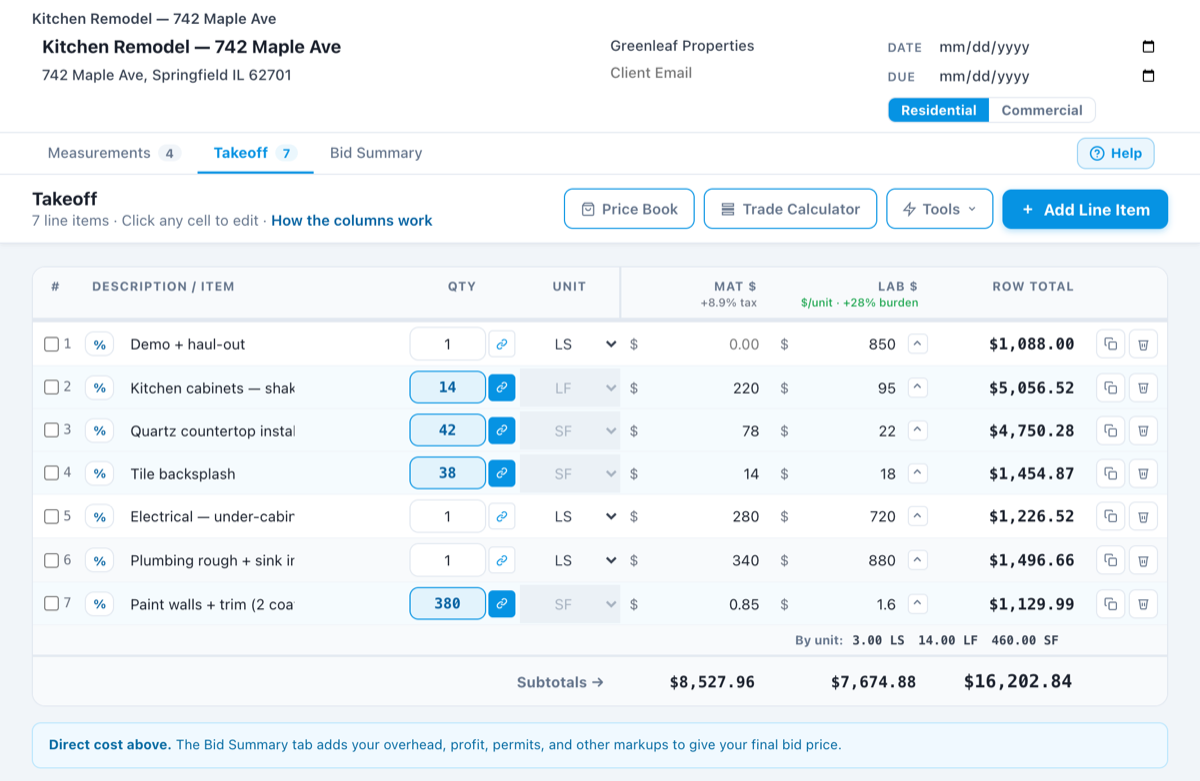
See it in Trades HQ
A sample estimate in Trades HQ. Each line has its own material and labor cost, and the Bid Summary adds your overhead and profit. Sample numbers.
Questions handymen ask
Should handymen charge hourly or a flat rate?
Many handymen estimate each job by the hour behind the scenes, then give the customer a flat price for the whole list. Trades HQ lets you build the estimate from your hours and materials, then send one clear total.
Can customers approve an estimate online?
Yes. You send the estimate by email or a link, the customer approves it online, and it shows as approved in Trades HQ. Then you can turn it into an invoice in one click.
Can I use Trades HQ on my phone?
Yes. Trades HQ runs in your phone’s web browser, and you can add it to your home screen like an app, so you can build an estimate or send an invoice from the truck.
Is there a free trial?
Yes. Every plan starts with a 14-day free trial, and you don’t need a credit card to start. Plans start at $75 a month, and you can cancel anytime.
Examples on this page use illustrative numbers only. Use your own costs, rates and local requirements. This page is general information, not legal, tax, or financial advice.