Estimating Software for Cabinet & Countertop Installers
Cabinet jobs are measured in linear feet, but priced in a hundred small details: fillers, crown, hardware and the countertop that comes after. Trades HQ keeps every piece on one estimate.
Linear feet hide the details. Fillers, end panels, crown, light rail and toe kick all add time and material.
Walls are rarely straight. Shimming and scribing to uneven walls and floors takes time.
Countertops are a separate job. Templating, fabrication and install often go to a fabricator.
Hardware and adjustments. Pulls, knobs, soft-close hardware and door adjustments add up across a kitchen.
How Trades HQ helps cabinet and countertop installers
Price book with cabinet and countertop items. Keep your prices and reuse them on every bid.
Measure from blueprints. Measure cabinet runs and countertop areas right off a blueprint PDF.
Labor-rate guidance by state. See typical carpenter wages in your state, then set your own rate.
Bid work out to other subs. Send one request for quotes to your countertop fabricator or plumber, and their bids come back through a simple form.
Proposals customers approve online, then one click to invoice.
Change orders when the customer adds an island or changes the countertop.
A cabinet install estimate, step by step
Measure the base and wall cabinet runs in linear feet.
List fillers, end panels, crown and trim as their own lines.
Add hardware and installation materials.
Measure countertop area, plus backsplash if included.
Get the countertop price from your fabricator.
Apply your overhead and profit.
Example (illustrative): an L-shaped kitchen with 10 ft and 12 ft walls.
Step
Math
Result
Base cabinet run
10 + 12
22 linear ft
Countertop area at about 25.5 in deep
22 × 25.5 ÷ 12
about 46.75 sq ft
Pricing tip: List fillers, panels and trim separately so a simple linear-foot price doesn't undercount the job. And remember that markup and margin aren't the same number: a 20% margin needs a 25% markup. The Estimating Basics guide walks through the math, and the free markup and margin calculator does it for you.
See it in Trades HQ
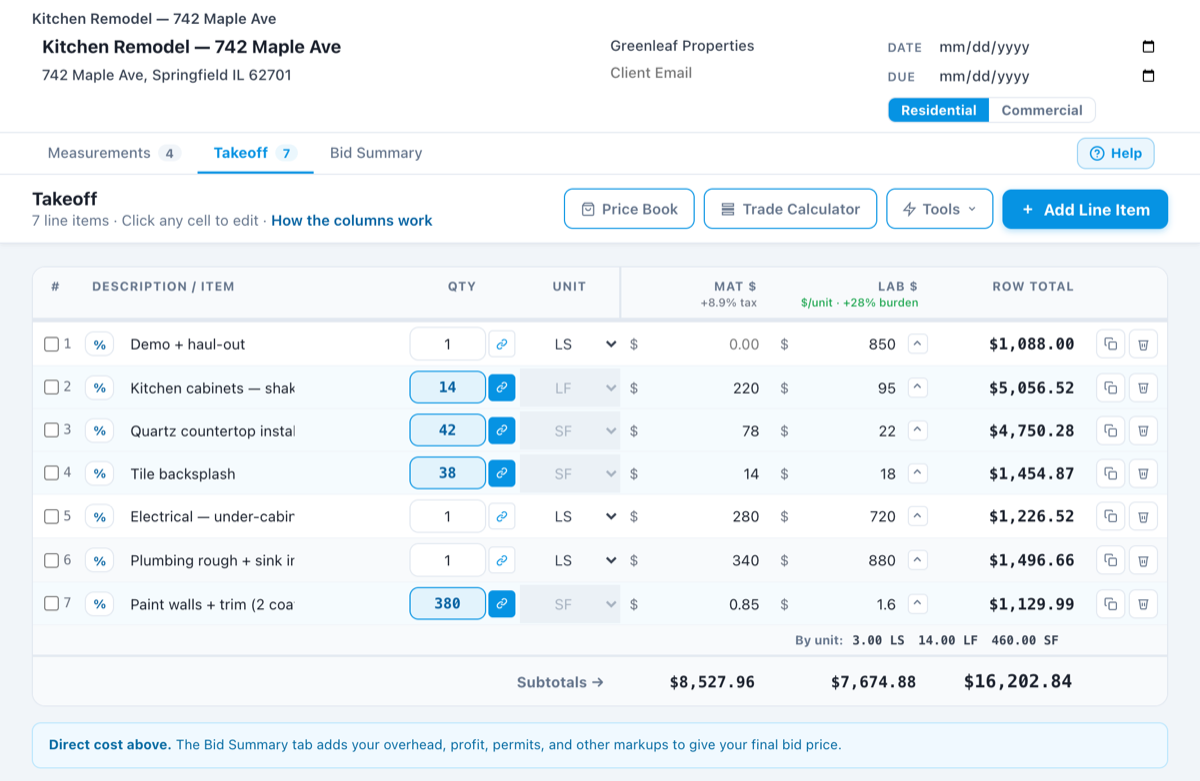
A sample estimate in Trades HQ. Each line has its own material and labor cost, and the Bid Summary adds your overhead and profit. Sample numbers.
Questions cabinet and countertop installers ask
How do cabinet installers price a job?
Many installers price by the linear foot or by the box, then add fillers, trim, crown, hardware and any extra work like scribing to uneven walls. Trades HQ keeps each of those as its own line so nothing gets left off.
Can I get a quote from my countertop fabricator through the app?
Yes. Send a request for quotes to your fabricator or other subs. They send their bids back through a simple form with no login, and the bids land in your project ready to compare.
Can I use Trades HQ on my phone?
Yes. Trades HQ runs in your phone’s web browser, and you can add it to your home screen like an app, so you can build an estimate or send an invoice from the truck.
Is there a free trial?
Yes. Every plan starts with a 14-day free trial, and you don’t need a credit card to start. Plans start at $75 a month, and you can cancel anytime.
Examples on this page use illustrative numbers only. Use your own costs, rates and local requirements. This page is general information, not legal, tax, or financial advice.