Carpentry Estimating Software for Finish & Framing Carpenters
Carpentry is priced by the piece, the linear foot and the hour, and trim jobs are full of small cuts that add up. Trades HQ helps you count it, price it and see whether the job made money.
Lots of small pieces. Baseboard, casing, crown and shoe each have their own count and cuts.
Material comes in fixed lengths. You buy whole boards, so waste depends on the room.
Old houses aren't square. Coping, scribing and shimming take longer than in new work.
Doors and hardware. Each door hang, slab swap or hardware install is its own task.
How Trades HQ helps carpenters
Price book with framing and finish carpentry items. Keep your prices and reuse them on every bid.
Measure from blueprints. Measure walls and runs right off a blueprint PDF.
Labor-rate guidance by state. See typical carpenter wages in your state, then set your own rate.
Material price requests. Send one price request to your lumber suppliers and turn the best quote into a purchase order.
Change orders when the customer adds rooms or upgrades trim.
Live job profit as labor and materials come in.
A trim estimate, step by step
Measure each room's perimeter.
Subtract door openings for baseboard.
Add a waste factor for cuts; many carpenters add about 10%.
Divide by the length of the boards you buy, and round up.
Count doors, windows and other pieces that need casing.
Estimate your hours, then apply your overhead and profit.
Example (illustrative): baseboard for a 12 × 14 ft room with one 3 ft door.
Step
Math
Result
Perimeter
12 + 14 + 12 + 14
52 ft
Minus the door
52 − 3
49 ft
Plus about 10% waste
49 × 1.10
about 54 ft
16 ft boards
54 ÷ 16
3.4, so 4 boards
Pricing tip: Count cuts, not just feet. Older houses with walls that aren't square take longer. And remember that markup and margin aren't the same number: a 20% margin needs a 25% markup. The Estimating Basics guide walks through the math, and the free markup and margin calculator does it for you.
See it in Trades HQ
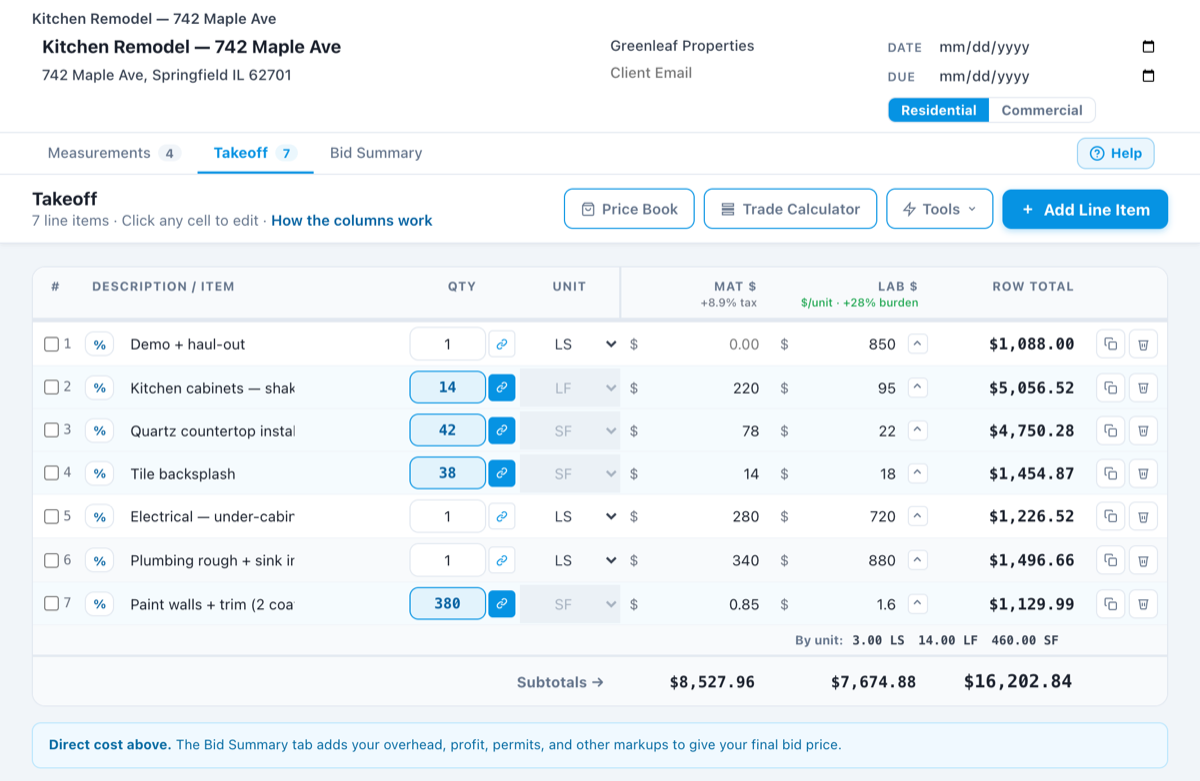
A sample estimate in Trades HQ. Each line has its own material and labor cost, and the Bid Summary adds your overhead and profit. Sample numbers.
Questions carpenters ask
How do I estimate trim for a room?
Measure the room perimeter, subtract door openings for baseboard, add about 10% for cuts, then divide by the length of the boards you buy and round up. Count casing separately for each door and window.
Can I price framing too?
Yes. Keep your framing materials in your price book, measure walls from the plans, and add your labor rate. Each item becomes its own line on the estimate.
Does it work with QuickBooks?
Trades HQ exports your invoices in a format ready to import into QuickBooks, so your bookkeeper doesn’t have to retype them.
Is there a free trial?
Yes. Every plan starts with a 14-day free trial, and you don’t need a credit card to start. Plans start at $75 a month, and you can cancel anytime.
Examples on this page use illustrative numbers only. Use your own costs, rates and local requirements. This page is general information, not legal, tax, or financial advice.